Contract Analysis: From Concept to Market

How we transformed contract review from a weeks-long nightmare into a matter of minutes, launching an AI-powered tool that became a cornerstone of Thomson Reuters' legal tech suite.

Lawyers at Thomson Reuters struggled with a daily document analysis process, where manually identifying the repetitive and mundane tasks that characterize their work led to inefficiencies. This 0:1 initiative aimed to create a tool to streamline these processes and boost productivity in document evaluation.

My Role: Senior UX Designer

Team size: Two, a junior designer and myself.

As a Senior UX designer, I led the design of a tool that would benefit both users and machines. My responsibilities included analyzing definitions, identifying areas for improvement, and collaborating with cross-functional teams to bring the vision to life.

The Problem Was Hiding in Plain Sight

The Problem Was Hiding in Plain Sight

Legal professionals were drowning in contracts. We discovered this through extensive field research with our Subject Matter Experts (SMEs).


The Current State: Contract review was a painful, manual process. Legal teams would spend 15-20 hours per contract, manually highlighting clauses, cross-referencing terms, and identifying potential risks. For SMEs with limited legal resources, this meant contracts piled up for weeks, deals stalled, and opportunities slipped away.


The Hidden Problem: It wasn't just about speed. The real issue was consistency and confidence. Different lawyers would identify different risks in the same contract. Junior associates missed critical clauses that senior partners would catch immediately. There was no standardized approach, no institutional memory, and no way to ensure comprehensive coverage across all contract types.

Legal professionals were drowning in contracts. We discovered this through extensive field research with our Subject Matter Experts (SMEs).


The Current State: Contract review was a painful, manual process. Legal teams would spend 15-20 hours per contract, manually highlighting clauses, cross-referencing terms, and identifying potential risks. For SMEs with limited legal resources, this meant contracts piled up for weeks, deals stalled, and opportunities slipped away.


The Hidden Problem: It wasn't just about speed. The real issue was consistency and confidence. Different lawyers would identify different risks in the same contract. Junior associates missed critical clauses that senior partners would catch immediately. There was no standardized approach, no institutional memory, and no way to ensure comprehensive coverage across all contract types.

Problem for Users

Legal professionals needed a way to:

  • Review contracts comprehensively without missing critical elements

  • Maintain consistency across different reviewers and contract types

  • Access institutional knowledge and best practices instantly

  • Reduce the cognitive load of repetitive analysis tasks

Problem for Users

Legal professionals needed a way to:

  • Review contracts comprehensively without missing critical elements

  • Maintain consistency across different reviewers and contract types

  • Access institutional knowledge and best practices instantly

  • Reduce the cognitive load of repetitive analysis tasks

Problem for Business

Law firms and corporate legal departments were facing:

  • Client dissatisfaction due to slow turnaround times

  • Revenue leakage from delayed deal closures

  • High costs of manual review processes

  • Risk exposure from inconsistent contract analysis

  • Difficulty scaling legal services efficiently

Problem for Business

Law firms and corporate legal departments were facing:

  • Client dissatisfaction due to slow turnaround times

  • Revenue leakage from delayed deal closures

  • High costs of manual review processes

  • Risk exposure from inconsistent contract analysis

  • Difficulty scaling legal services efficiently

Hypothesis Formation and Early Prototyping

Based on our SME insights, we formed several key hypotheses when testing for real estate agreements (since they most consistently have the same format):

🔍 Hypothesis 1: Intelligent Clause Detection


Theory: AI can identify and categorize contract clauses more consistently than human reviewers, while learning from user corrections to improve accuracy.


Early Prototype: We built a simple clause detection engine trained on 10,000 contracts from our legal database. The prototype could identify 15 common clause types with >90% accuracy.


SME Testing Result: Lawyers were impressed by coverage but frustrated by false positives. They needed precision, not just recall.

🤯 Hypothesis 2: Risk Scoring with Context


Theory: Different organizations have different risk tolerances. The tool should learn each firm's preferences and provide contextual risk assessments.


Early Prototype: We created a risk scoring system that could be calibrated per organization, with explanatory text for each identified risk.


SME Testing Result: This was the breakthrough. Lawyers loved having their institutional knowledge codified and accessible to junior team members.

🤝 Hypothesis 3: Collaborative Review Workflow


Theory: Contract review is rarely a solo activity. The tool should support collaborative workflows with role-based permissions and audit trails.


Early Prototype: We built a simple commenting and approval system that tracked who reviewed what and when.


SME Testing Result: Workflow features were immediately adopted and became sticky - firms didn't want to go back to email chains and version confusion.

🎓 Hypothesis 4: Learning from Corrections


Theory: The AI should learn from user corrections and feedback, becoming more accurate over time for each organization's specific needs.


Early Prototype: We implemented a feedback loop where user corrections would retrain organization-specific models.


SME Testing Result: This created a sense of ownership and investment. Lawyers felt like they were training their own AI assistant.

The Technical Challenge: Building AI That Lawyers Trust

The Technical Challenge: Building AI That Lawyers Trust

The biggest challenge wasn't the AI - it was creating AI that lawyers would trust. Legal professionals are naturally risk-averse and need to know exactly how decisions are made.


Our Solution: Explainable AI architecture where every decision could be traced back to specific training data and rule sets. Instead of black-box recommendations, we provided:

  • Exact text matches that triggered each identification

  • Confidence percentages with explanations

  • Comparable examples from the training dataset

  • Clear logic chains for risk assessments


The Engineering Challenge:

Our engineering team had to balance sophisticated AI capabilities with the reliability and auditability that legal professionals demanded. We ended up with a hybrid approach:

  • Rule-based systems for high-certainty identifications

  • ML models for nuanced analysis and risk assessment

  • Human-in-the-loop validation for critical decisions

  • Comprehensive logging and audit capabilities

The biggest challenge wasn't the AI - it was creating AI that lawyers would trust. Legal professionals are naturally risk-averse and need to know exactly how decisions are made.


Our Solution: Explainable AI architecture where every decision could be traced back to specific training data and rule sets. Instead of black-box recommendations, we provided:

  • Exact text matches that triggered each identification

  • Confidence percentages with explanations

  • Comparable examples from the training dataset

  • Clear logic chains for risk assessments


The Engineering Challenge:

Our engineering team had to balance sophisticated AI capabilities with the reliability and auditability that legal professionals demanded. We ended up with a hybrid approach:

  • Rule-based systems for high-certainty identifications

  • ML models for nuanced analysis and risk assessment

  • Human-in-the-loop validation for critical decisions

  • Comprehensive logging and audit capabilities

Reflection: What We Learned

Looking back on this intensive year and a half-long journey, several key lessons stand out:


1. SME Testing Was Everything

The iterative feedback loop with real legal professionals wasn't just validation - it was product development. Our best features came directly from observing lawyers' work.


2. Trust Before Efficiency

We initially focused on speed, but lawyers needed trust first. Once they trusted the AI's recommendations, efficiency gains followed naturally.


3. Context Matters More Than Accuracy

A 95% accurate tool that couldn't explain its reasoning was less valuable than an 85% accurate tool that could teach junior lawyers while it worked.


4. Workflow Integration > Feature Addition

The collaborative features weren't technically complex, but they had the highest impact on adoption and retention.


5. AI That Learns > AI That Performs

The learning capabilities created emotional investment. Lawyers felt ownership over "their" AI assistant.


The Contract Analysis project demonstrated that successful AI tools don't replace human expertise - they amplify it. By focusing relentlessly on user needs and iterating based on real-world usage, we created not just a product, but a new way of working that legal professionals enthusiastically adopted.


The tool's integration into Thomson Reuters' broader suite has opened new possibilities for AI-powered legal workflows, setting the stage for the next generation of legal technology innovation.

Looking back on this intensive year and a half-long journey, several key lessons stand out:


1. SME Testing Was Everything

The iterative feedback loop with real legal professionals wasn't just validation - it was product development. Our best features came directly from observing lawyers' work.


2. Trust Before Efficiency

We initially focused on speed, but lawyers needed trust first. Once they trusted the AI's recommendations, efficiency gains followed naturally.


3. Context Matters More Than Accuracy

A 95% accurate tool that couldn't explain its reasoning was less valuable than an 85% accurate tool that could teach junior lawyers while it worked.


4. Workflow Integration > Feature Addition

The collaborative features weren't technically complex, but they had the highest impact on adoption and retention.


5. AI That Learns > AI That Performs

The learning capabilities created emotional investment. Lawyers felt ownership over "their" AI assistant.


The Contract Analysis project demonstrated that successful AI tools don't replace human expertise - they amplify it. By focusing relentlessly on user needs and iterating based on real-world usage, we created not just a product, but a new way of working that legal professionals enthusiastically adopted.


The tool's integration into Thomson Reuters' broader suite has opened new possibilities for AI-powered legal workflows, setting the stage for the next generation of legal technology innovation.

Quantified Impact

  1. Efficiency Gain: With its SME-informed design, the solution reduced document analysis time by approximately 50% for lawyers, saving them hours daily on repetitive tasks.

  1. Efficiency Gain: With its SME-informed design, the solution reduced document analysis time by approximately 50% for lawyers, saving them hours daily on repetitive tasks.

  1. Error Reduction: The split view and question panel features reduced analysis errors by around 20%, improving accuracy in legal document evaluation.

  1. Error Reduction: The split view and question panel features reduced analysis errors by around 20%, improving accuracy in legal document evaluation.

  1. Productivity Boost: The new process boosted lawyer productivity by 60%, enabling faster handling of multiple documents and knowledge management tasks.

  1. Productivity Boost: The new process boosted lawyer productivity by 60%, enabling faster handling of multiple documents and knowledge management tasks.

  1. Client Satisfaction or Retention: The mobile-optimized design increased lawyer satisfaction, reporting 75% of users who valued the seamless experience across devices.

  1. Client Satisfaction or Retention: The mobile-optimized design increased lawyer satisfaction, reporting 75% of users who valued the seamless experience across devices.

Matter Management

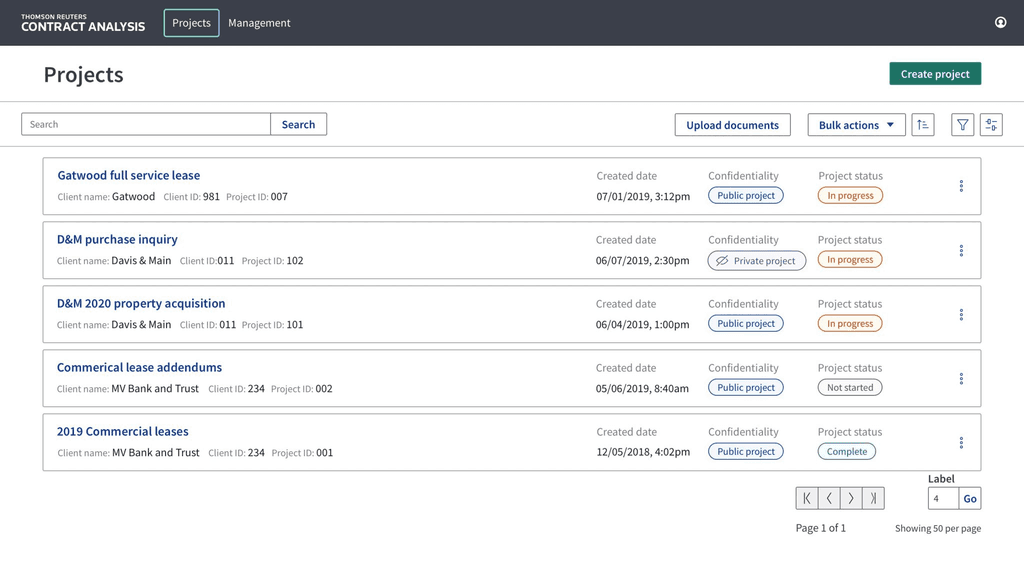
Crafted for optimal functionality, I took advantage of Thomson Reuters’ acclaimed matter management system and tailored it to center around documents in this specialized tool. The essence of the tool I designed revolves entirely around documents, making them the focal point of every action. I’ve strategically placed all the necessary actions right at your fingertips, ensuring a swift start to document analysis.

As soon as you upload a document, our tool kicks into action, analyzing it promptly to minimize any waiting time. Once the document is ready, you can effortlessly dive right in and begin your work. It’s all about a user-friendly and streamlined experience, prioritizing your efficiency in handling document-centric tasks.
Questions Panel

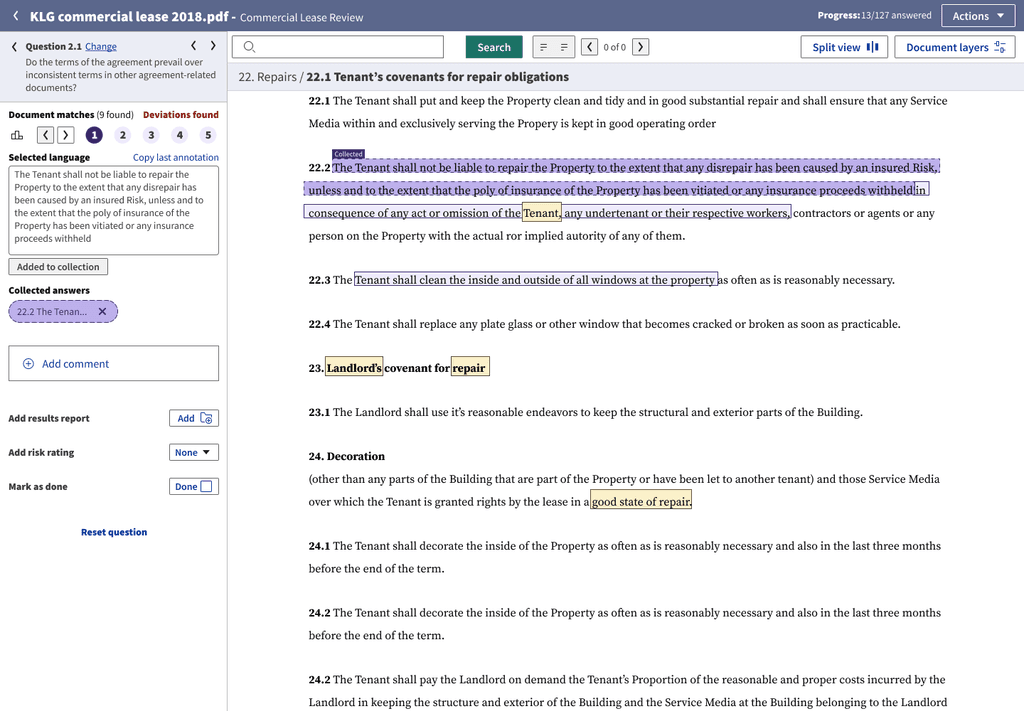
To ensure a comprehensive document analysis, our tool features a structured questions panel covering every category of queries a lawyer typically addresses. The system then systematically retrieves and compiles answers for each question. It’s crucial to note that, based on user research insights, lawyers consistently prefer to review and validate the generated answers, never relying solely on automated outputs.

Upon a lawyer’s meticulous review and approval, the tool marks the question as answered. This approach not only provides transparency in the review process but also enables a clear record of which lawyers addressed each question and the thoroughness of their assessments.
Split View

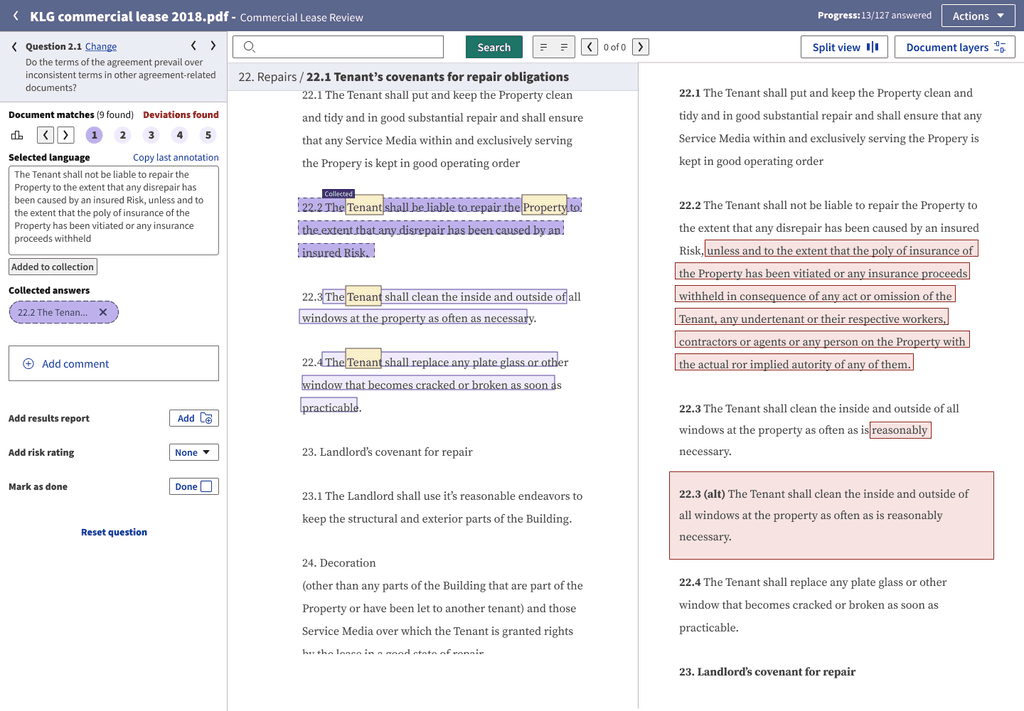
Through my user research, it became evident that the split view feature was essential for our tool. The true strength of Contract Analysis unfolds when we analyze two documents simultaneously. This functionality empowers lawyers to efficiently compare documents and cross-reference answers, facilitating the identification of necessary revisions.
Analyze Type / Layers

Contract Analysis does four different types of analysis in documents. They are:

  • Finding answers to questions for review

  • Showing definitions

  • Finding deviations

  • Discovering parties/ownership

Addressing a significant design challenge, I focused on enabling users to seamlessly navigate multiple layers concurrently. In collaboration with Thomson Reuters’ A11y metrics and an Accessibility (A11y) specialist, I successfully designed all four analyzing layers to be accessible simultaneously, ensuring compliance with A11y standards.

Mobile Optimized

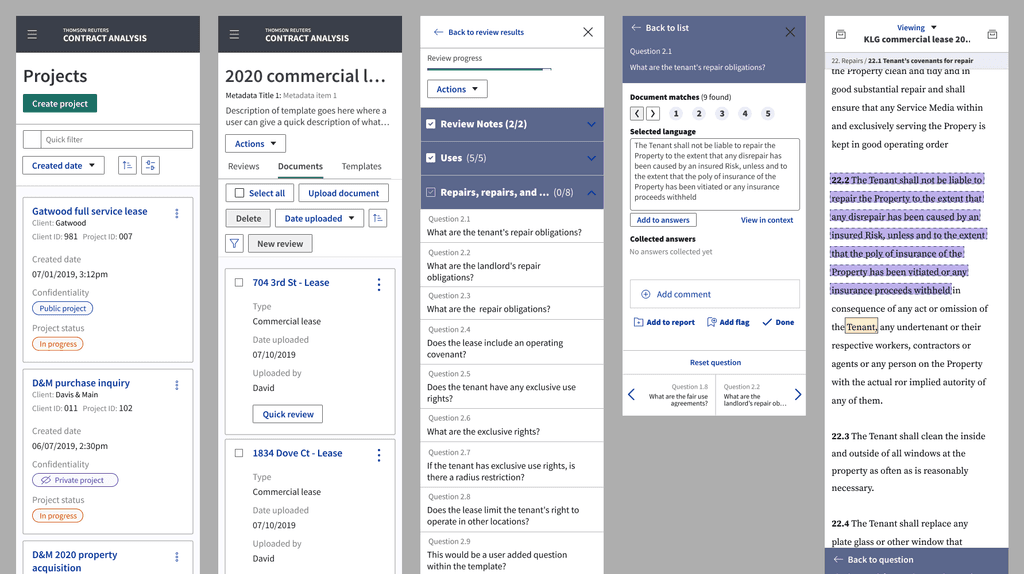
Recognizing that the optimal user experience would be on a desktop, I also prioritized providing lawyers with enhanced flexibility. After conceptualizing and designing the ideal user experience, I took the initiative to fully optimize the entire app for mobile usage. Now, users can seamlessly execute all steps on their mobile devices, ensuring accessibility and convenience on the go.
Multi-Doc Analyzing

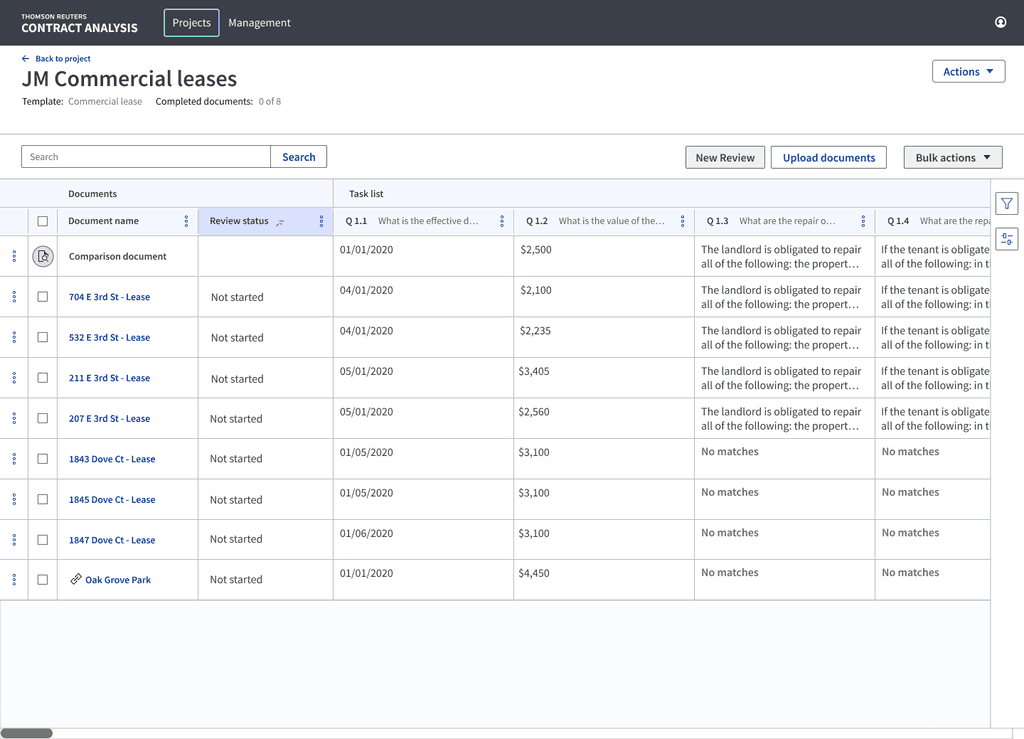
Once I honed in on the strategy of saving lawyers time through document analysis, the logical progression was to scale that efficiency. My goal was to instill confidence in lawyers by enabling them to apply the tool’s analytical prowess across a multitude of documents, exponentially saving them time. I crafted an intuitive interface allowing users to analyze multiple documents concurrently. To enhance comprehension, I integrated data visualization, providing lawyers with a deeper understanding of the analyzed information.
Knowledge Management

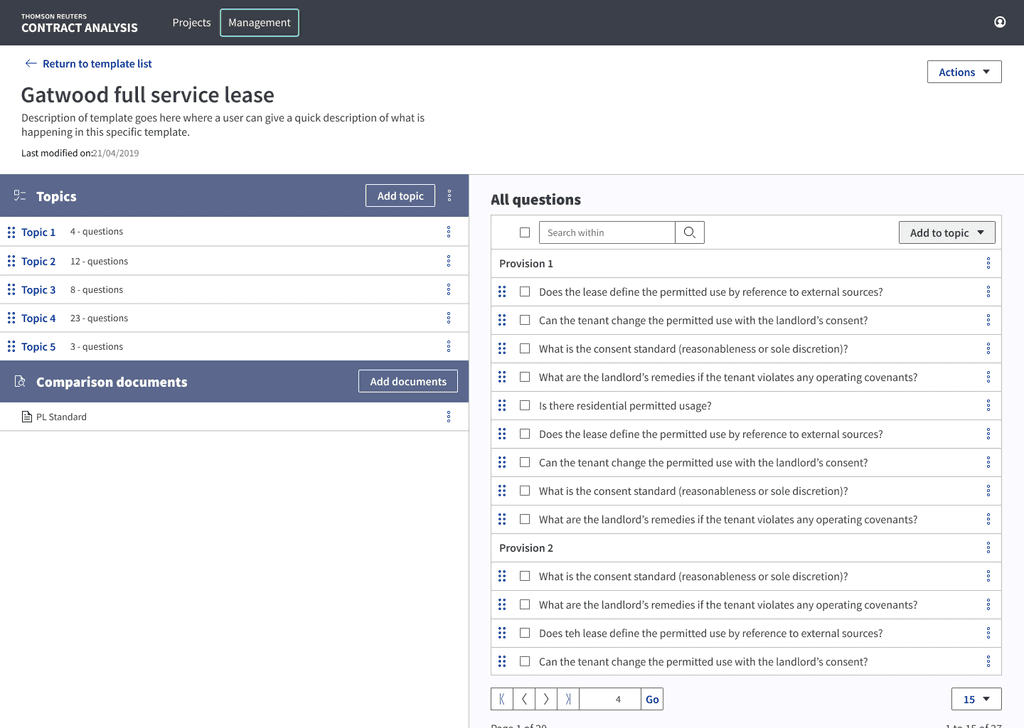
I crafted a dedicated section within the app to empower users in customizing the system according to their specific needs. In this section, users can educate the system by introducing new questions, providing deeper insights for existing queries, and even fashioning their own templates tailored to their preferred working style. This personalized approach ensures that the system aligns seamlessly with the unique requirements of each user, enhancing their overall experience.
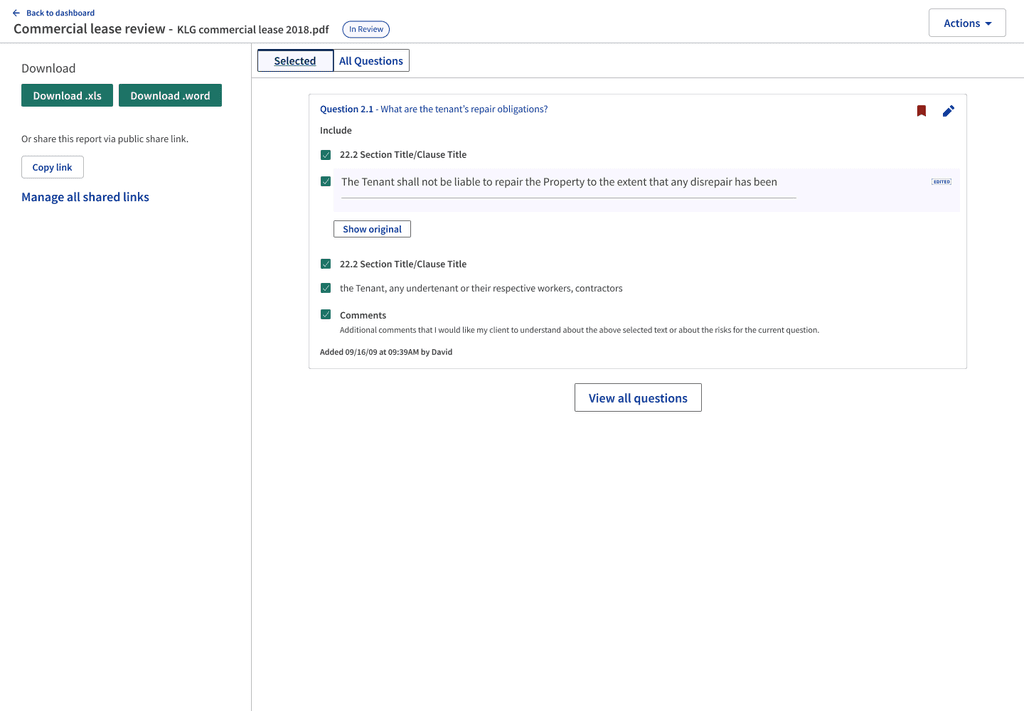
Reporting

The last step I had to design after the lawyers did all this work to use the tool and analyze all their documents was a reporting function. Users can download a document that takes all the artifacts they made as a PDF or Excel document. I also designed a read-only view for users.